Home > Products > Heating Cable Accessories > Floor Heating Thermostat
1.Economical
2.Replace virtually any two-wire line voltage wall-mounted electric heating thermostat
3.Easy to install
4.Rugged, plastic mounting base and one-piece cover with vents
5.Ideally suited to new construction applications
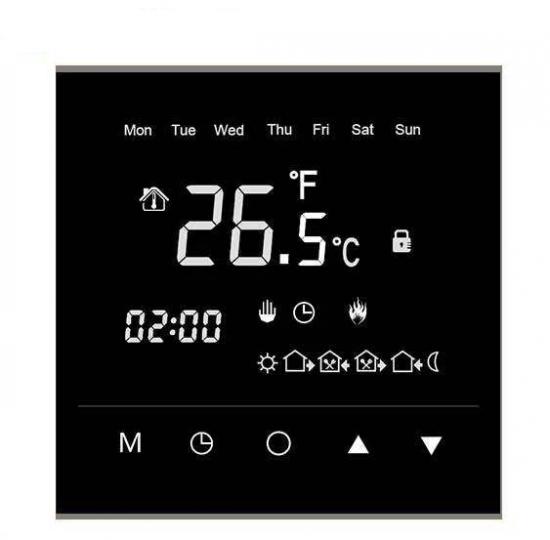
Product Name:E1608 Digital Smart Wifi Electronic Heat Thermostat
Product Technical Parameters
| Thermostat range: -9.5~80.0℃ | Overall dimension: 86*86*40mm |
| Temperature sensing elements: thermistor | External wire diameter: 2,5 square mini-meter (mm)² |
| Temperature control precision: ±1℃ | Working temperature: 85~265VAC 50\60Hz |
| Mounting hole spacing: 60mm (standard) | Shell: flame retardant PC material |
| Floor temperature range: -9.5~80.0℃ | Rated power: 16A |
Notes of display
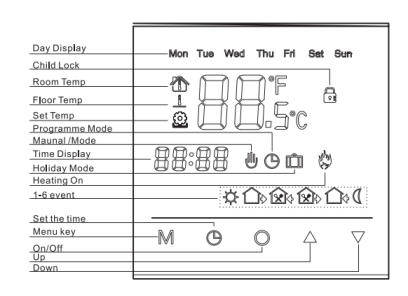
Product Operation Instruction
1) On/Off: briefly press “On/Off” button to switch on.off the thermostat.
2) Set temperature: with the unit on, briefly press the “▲”or“▼”buttons to adjust the temperature, and each pressing will set up the temperature change by 1℃.
3) Mode switching: with the unit on, keep the “Set the time” button pressed for 3S to switch the manual or automatic (time interval) mode.
4) Manual switch: with the unit on, briefly press the “Menu key” in turn button to switch to the standard mode and economic mode, and and briefly press the “▲”or“▼” buttons to adjust the corresponding setups of temperatures.
5) Time setup: keep the “Set the time” button for 3S to enter the time adjustment setup. Briefly press the “Set the time”in turn to adjust the flashing minutes, hours and week days. Briefly press the “▲”or “▼” buttons to adjust the relevant time.
6)Child lock setup: keep the “▼ ”pressed for 3S to switch on or off the Child lock function.
7)Period Setting: After power off, press and hold “Menu key ” for 3s to enter the period setting function.Detailed operation is as follow
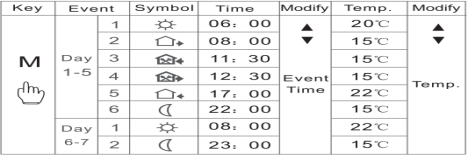
8)Advanced settings: with the unit off, spontaneous keep the “▲”or“▼” buttons pressed for 3S to enter the advanced setting function and the specific operations are shown as below:
Numerals on the upper right corner |
Definition of the |
Range |
Note |
Default |
Operation |
00 |
Adjusted values of room temperature |
±10.0℃ |
Fine-tuning values of the room temp. sensor |
0℃ |
Press button to switch the parameter values and press DONE button to exit |
01 |
Adjusted values of floor temperature |
±10.0℃ |
Fine-tuning values of floor temp. sensor |
0℃ |
|
02 |
Sensor selection |
00-02 |
00 built-in 01 external 02 built-in and external |
02 |
|
03 |
Setup of temperature upper limits |
30-60℃ |
Setup of maximum temperature values |
35℃ |
|
04 |
Setup of temperature lower limits |
5-15℃ |
Setup of minimum temperature values |
5℃ |
|
05 |
Setup of switch deviations |
0-10.0℃ |
Setup of output deviation values |
1.0℃ |
|
06 |
Low temperature protection function |
00-01 |
00 Off o1 On |
00 |
|
07 |
Selection of holiday |
00-02 |
00 double off-days 01 single off-day 02 no holiday |
00 |
|
08 |
Delayed output time |
00-10 |
0-10S delayed output time |
00 |
|
09 |
Warning value of floor temperature |
0-80℃ |
Max. Value of floor temperature |
60 |
|
10 |
Restore factory setting |
00-01 |
01 restore factory default |
00 |
Initialize Your WIFI Thermostat:
After turn off the thermostat, press and hold the“ON/OFF”until the screen displays "000", then press“▲”,change the value “000” to "010", finally press the “ON/OFF ”. Finishing all the above steps, the initialization of your thermostat has been successfully completed. You can download the APP to connect the
thermostat to your mobile phone, then control your thermostat according to the APP operation manua.
Malfunction Prompts:
In advanced setting, select the internal or external sensor properly,if wrong setting or sensor damaged, the LCD appears Er1 or ER2.
ER1 indicates no internal sensor detected;
ER2 indicates no external sensor detected.
The thermostat will not work until the fault is eliminated.
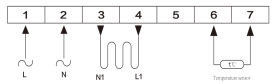
Wiring Diagram
Warning:
Wiring must be correctly carried out as per the above diagram. The thermostat should be free from
water, mud and other foreign substance, otherwise it could be damaged!

Anhui Huanrui Heating Manufacturing Co.,Ltd provides self-regulating and constant wattage heating cables for industrial and residential applications. Our certified solutions offer reliable freeze protection and temperature maintenance. Trusted by global clients. Contact us today.
Jingsan Road, Feidong Economic Development Zone, Hefei
Copyright © 2025 by Anhui Huanrui Heating Manufacturing Co.,Ltd Privacy Policy
 EN
EN